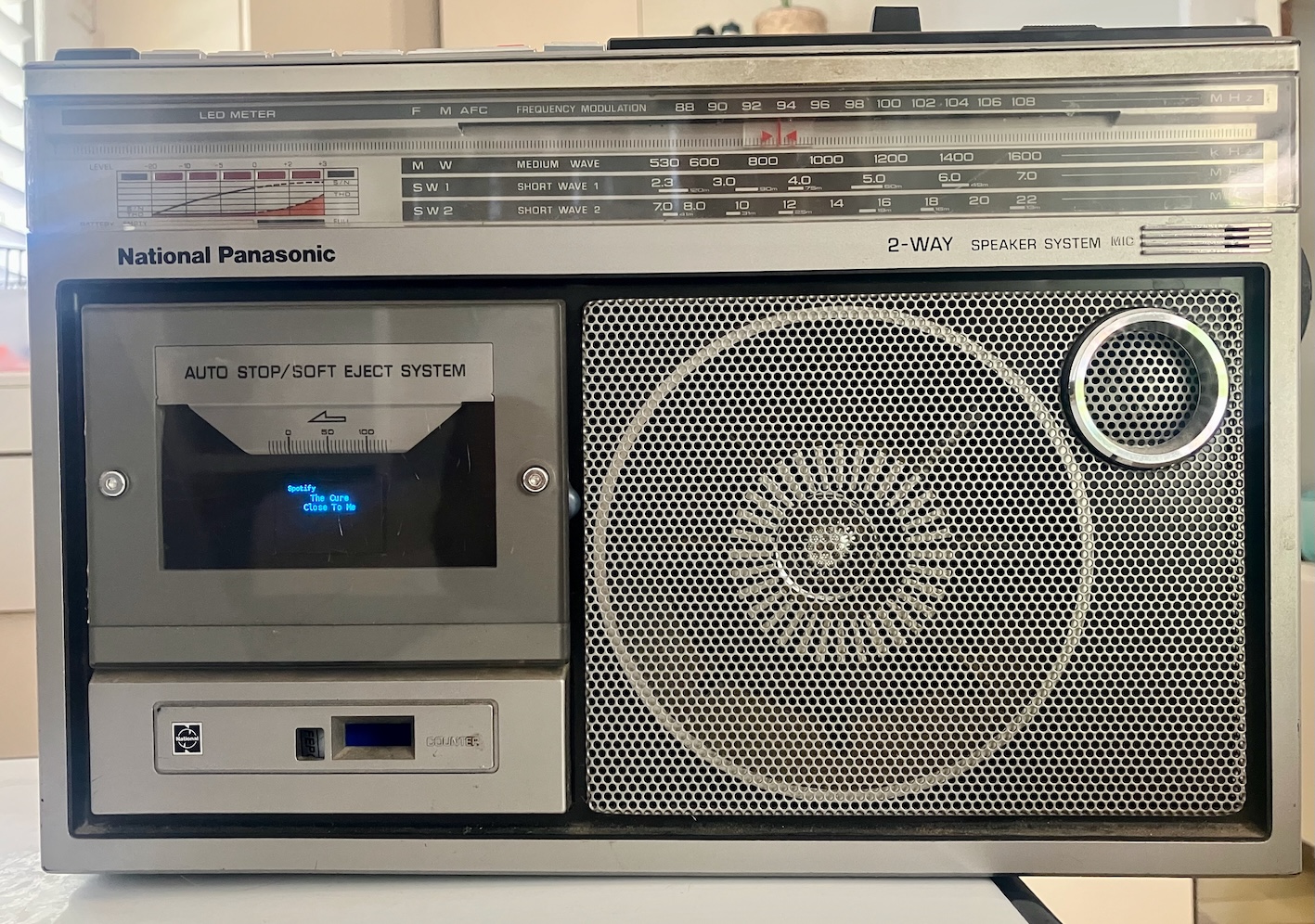
Setting up an OLED screen to work with Moode
Prerequisites
- A Raspberry Pi running moode. I used the Pi Imager for this. I am using the current PiOS as of 20 Feb 2026.
riaz@boombox:~ $ uname -a
Linux boombox 6.12.62+rpt-rpi-v8 #1 SMP PREEMPT Debian 1:6.12.62-1+rpt1 (2025-12-18) aarch64 GNU/Linux
- An OLED screen connected via I2C. I have a 64x128 one running the SSD1306 chip.
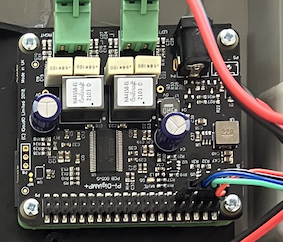
- Connect the oled screen to the Pi GPIO headers. Here is a poor quality photo of how my OLED connects to my pi.
Steps
These are the steps I took to get things working. While figuring this out I referenced these docs:
- The luma-oled library
- The luma.examples repo
- An old repo that created a python file using an old Adafruit lib to output song info to the oled.
Setting up luma-oled
All these commands are done on the pi. So ssh in first.
Hardware
- Enable the I2C interface
- Run
sudo raspi-config - Use the down arrow to select 3 Interfacing Options
- Arrow down to I5 I2C
- Select yes when it asks you to enable I2C
- Use the right arrow to select the button
- Reboot
Make sure i2c is loaded
riaz@boombox:~ $ dmesg | grep i2c
[    6.993846] i2c_dev: i2c /dev entries driver
[  647.799401] OF: overlay: WARNING: memory leak will occur if overlay removed, property: /soc/i2c@7e804000/status
[ 1666.714005] OF: overlay: WARNING: memory leak will occur if overlay removed, property: /soc/i2c@7e804000/status
- Add user to i2c group and install i2c-tools
riaz@boombox:~ $ sudo usermod -a -G i2c riaz
riaz@boombox:~ $ sudo apt-get install i2c-tools
Log out and in again to load group permissions
- Determine i2c address using
i2cdetect
riaz@boombox:~ $ i2cdetect -y 1
     0  1  2  3  4  5  6  7  8  9  a  b  c  d  e  f
00:                         -- -- -- -- -- -- -- --
10: -- -- -- -- -- -- -- -- -- -- -- -- -- -- -- --
20: -- -- -- -- -- -- -- -- -- -- -- -- -- -- -- --
30: -- -- -- -- -- -- -- -- -- -- -- -- 3c -- -- --
40: -- -- -- -- -- -- -- -- -- -- -- -- UU -- -- --
50: -- -- -- -- -- -- -- -- -- -- -- -- -- -- -- --
60: -- -- -- -- -- -- -- -- -- -- -- -- -- -- -- --
70: -- -- -- -- -- -- -- --
For the above result, the i2c address is 0x3c. I don’t know why. I guess you just add 0x to the 3c. Refer to luma docs for more info.
If it is 0x3c then you are in luck; the luma examples use this address so they should work with no configuration required.
If it is not, you’ll have to modify the examples we use below and enter your address.
Software
The luma docs use a python virtual environment in the user’s home directory. That feels a bit weird to me, since this is going to drive a display, but whatever, time is limited.
# make venv
python3 -m venv ~/luma-env

# install lib
~/luma-env/bin/python -m pip install --upgrade luma.oled

# install dependencies
sudo apt-get update

# this didn't work, the libs are outdated
#sudo apt-get install python3 python3-pip python3-pil libjpeg-dev zlib1g-dev libfreetype6-dev liblcms2-dev libopenjp2-7 libtiff5 -y

# this did work
sudo apt-get install python3 python3-pip python3-pil libjpeg-dev zlib1g-dev libfreetype-dev liblcms2-dev libopenjp2-7 libtiff6 -y
Then add the user who will use luma.oled to the required groups so that they can interact with the hardware
sudo usermod -a -G spi,gpio,i2c pi
Logout and login to load permissions
Testing functionality
I tested things out by trying out some examples from the luma.examples repository.
sudo apt install git
git clone https://github.com/rm-hull/luma.examples.git
cd luma.examples/examples
There are a lot of examples here. We’ll just try out the one from the README:
~/luma-env/bin/python 3d_box.py
You should see a 3d box on your oled screen.
Making the oled work on startup
Ok, so by now you’ll have gathered that the oled is driven by a python file. So, I’m going to create a file in my home directory called oled.py, and use systemd to run it on boot.
I am just going to create oled.py in the exmaples folder, so we can make use of the imports in the exmaples without thinking too hard about it.
We are still in the ~/luma.examples/examples folder.
cp sys_info_extended.py oled.py
Install deps:
~/luma-env/bin/python -m pip install --upgrade luma.oled
Test:
/home/riaz/luma-env/bin/python /home/riaz/luma.examples/examples/oled.py
You should have system stats on your oled now.
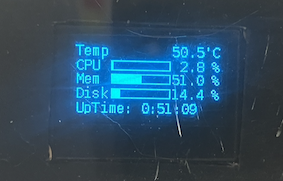
Now we will create a systemd service. Create the file /etc/systemd/system/oled.service
[Unit]
Description=RPi Oled Driver
After=multi-user.target

[Service]
ExecStartPre=/bin/sleep 60
TimeoutStartSec=120
ExecStart=/home/riaz/luma-env/bin/python /home/riaz/luma.examples/examples/oled.py
Restart=always
User=riaz
Group=riaz
[Install]
WantedBy=multi-user.target
Then start the service (it’ll take a while - note the wait time configured in the systemd file.)
sudo systemctl start oled.service
Your oled screen should be displaying system stats now.
Now enable the service so it comes up on reboot
sudo systemctl enable oled.service
If you want to be super sure, reboot the pi now and see if the oled screen comes back up.
Altering oled.py to show moode info
Ok, you can stop here, and you’ll have system stats on your screen. I went a bit further, and tried to add the song stats. I did not manage to get this to work with songs that come from bluetooth, but Airplay and Spotify Connect work.
Getting song data to show up on the screen is pretty easy if you just use moode directly. But it’s much harder if you want to show song data for songs you stream via spotify or airplay.
After about 2 hours of back and forth with Claude, I came up with this script (adapted from the sysinfo extended script).
If nothing is playing, it’ll put out system stats - useful to verify your pi is running and getting the IP address.
If something is playing and data is available, it’ll display it on the screen. If there is no data available, it’ll just put out the name of the renderer (bluetooth, spotify or what have you).
#!/usr/bin/env python
# -*- coding: utf-8 -*-
# Adapted from 2023 Richard Hull and contributors
# See https://github.com/rm-hull/luma.examples


import time
import sqlite3
from pathlib import Path
from datetime import datetime
from demo_opts import get_device
from luma.core.render import canvas
from PIL import ImageFont
import psutil
import subprocess as sp
import socket
from collections import OrderedDict


def get_temp():
    temp = float(sp.getoutput("vcgencmd measure_temp").split("=")[1].split("'")[0])
    return temp


def get_cpu():
    return psutil.cpu_percent()


def get_mem():
    return psutil.virtual_memory().percent


def get_disk_usage():
    usage = psutil.disk_usage("/")
    return usage.used / usage.total * 100


def get_uptime():
    uptime = ("%s" % (datetime.now() - datetime.fromtimestamp(psutil.boot_time()))).split(".")[0]
    return "UpTime: %s" % (uptime)


def find_single_ipv4_address(addrs):
    for addr in addrs:
        if addr.family == socket.AddressFamily.AF_INET:  # IPv4
            return addr.address


def get_ipv4_address(interface_name=None):
    if_addrs = psutil.net_if_addrs()
    if_stats = psutil.net_if_stats()

    if isinstance(interface_name, str) and interface_name in if_addrs:
        addrs = if_addrs.get(interface_name)
        address = find_single_ipv4_address(addrs)
        return address if isinstance(address, str) else ""
    else:
        # filter out loopback interfaces based on their address
        if_addrs_filtered = {
            iface: addrs
            for iface, addrs in if_addrs.items()
            if not any(addr.address == '127.0.0.1' for addr in addrs if addr.family == socket.AF_INET)
        }

        if_names_sorted = [
            iface for iface, _ in sorted(if_stats.items(), key=lambda x: (x[1].isup, x[1].duplex), reverse=True)
            if iface in if_addrs_filtered
        ]

        if_addrs_sorted = OrderedDict((iface, if_addrs_filtered[iface]) for iface in if_names_sorted)

        for _, addrs in if_addrs_sorted.items():
            address = find_single_ipv4_address(addrs)
            if isinstance(address, str):
                return address

        return ""


def get_ip(network_interface_name):
    return "IP: %s" % (get_ipv4_address(network_interface_name))


def format_percent(percent):
    return "%5.1f" % (percent)


def draw_text(draw, margin_x, line_num, text):
    draw.text((margin_x, margin_y_line[line_num]), text, font=font_default, fill="white")


def draw_bar(draw, line_num, percent):
    top_left_y = margin_y_line[line_num] + bar_margin_top
    draw.rectangle((margin_x_bar, top_left_y, margin_x_bar + bar_width, top_left_y + bar_height), outline="white")
    draw.rectangle((margin_x_bar, top_left_y, margin_x_bar + bar_width * percent / 100, top_left_y + bar_height), fill="white")


def draw_bar_full(draw, line_num):
    top_left_y = margin_y_line[line_num] + bar_margin_top
    draw.rectangle((margin_x_bar, top_left_y, margin_x_bar + bar_width_full, top_left_y + bar_height), fill="white")
    draw.text((65, top_left_y - 2), "100 %", font=font_full, fill="black")


MOODE_DB = "/var/local/www/db/moode-sqlite3.db"
SPOTMETA_FILE = "/var/local/www/spotmeta.txt"
APLMETA_FILE = "/var/local/www/aplmeta.txt"

RENDERER_PARAMS = {
    "spotactive": ("Spotify", SPOTMETA_FILE),
    "aplactive": ("AirPlay", APLMETA_FILE),
    "btactive": ("Bluetooth", None),
    "slactive": ("Squeezelite", None),
    "rbactive": ("Roon", None),
    "inpactive": ("Analog In", None),
}


def get_active_renderer():
    """Query moOde DB for active renderer. Returns (name, meta_file) or None."""
    try:
        conn = sqlite3.connect(MOODE_DB)
        params = list(RENDERER_PARAMS.keys())
        placeholders = ",".join("?" for _ in params)
        cursor = conn.execute(
            "SELECT param, value FROM cfg_system WHERE param IN (%s)" % placeholders,
            params
        )
        for param, value in cursor:
            if str(value) == "1":
                conn.close()
                return RENDERER_PARAMS[param]
        conn.close()
    except Exception:
        pass
    return None


def parse_renderer_meta(filepath):
    """Parse a moOde ~~~-delimited metadata file. Returns dict or None."""
    try:
        content = Path(filepath).read_text().strip()
        if not content:
            return None
        parts = content.split("~~~")
        if len(parts) >= 3:
            return {
                "title": parts[0],
                "artist": parts[1],
                "album": parts[2],
                "format": parts[5] if len(parts) > 5 else "",
            }
    except Exception:
        pass
    return None


def get_mpd_playing():
    """Check if MPD is actively playing. Returns dict or None."""
    try:
        import json
        import urllib.request
        resp = urllib.request.urlopen("http://localhost/engine-mpd.php", timeout=3)
        data = json.loads(resp.read())
        if data.get("state") == "play":
            return {
                "title": data.get("title", "Unknown"),
                "artist": data.get("artist", "Unknown"),
                "album": data.get("album", ""),
                "format": data.get("encoded", ""),
            }
    except Exception:
        pass
    return None


SCROLL_SPEED = 2       # Pixels per frame
SCROLL_PAUSE = 3       # Frames to pause at start and end
SCROLL_GAP = 20        # Pixels of gap before text repeats

# Scroll state: tracks offset and pause counter per field, resets on song change
_scroll_state = {"artist": "", "title": "", "artist_off": 0, "title_off": 0,
                 "artist_pause": SCROLL_PAUSE, "title_pause": SCROLL_PAUSE}


def _scroll_x(text, text_w, width, field):
    """Calculate x position for text, advancing scroll state if needed."""
    if text_w <= width:
        # Fits on screen - center it, reset scroll
        _scroll_state[field + "_off"] = 0
        _scroll_state[field + "_pause"] = SCROLL_PAUSE
        return (width - text_w) // 2

    # Text is wider than screen - scroll it
    off = _scroll_state[field + "_off"]
    pause = _scroll_state[field + "_pause"]
    max_off = text_w - width + SCROLL_GAP

    if off == 0 and pause > 0:
        # Pause at start
        _scroll_state[field + "_pause"] = pause - 1
        return 0
    elif off >= max_off:
        # Reached the end - reset with pause
        _scroll_state[field + "_off"] = 0
        _scroll_state[field + "_pause"] = SCROLL_PAUSE
        return 0
    else:
        # Scroll left
        _scroll_state[field + "_off"] = off + SCROLL_SPEED
        return -off


def draw_now_playing(device, source, info):
    """Draw now-playing screen with song details."""
    # Reset scroll state when song changes
    if info["artist"] != _scroll_state["artist"] or info["title"] != _scroll_state["title"]:
        _scroll_state["artist"] = info["artist"]
        _scroll_state["title"] = info["title"]
        _scroll_state["artist_off"] = 0
        _scroll_state["title_off"] = 0
        _scroll_state["artist_pause"] = SCROLL_PAUSE
        _scroll_state["title_pause"] = SCROLL_PAUSE

    with canvas(device) as draw:
        w = device.width

        # Source label at top left
        draw.text((0, 0), source, font=font_full, fill="white")

        # Artist - scrolls if too wide
        artist = info["artist"].replace("\n", " ")
        artist_w = draw.textlength(artist, font=font_default)
        ax = _scroll_x(artist, artist_w, w, "artist")
        draw.text((ax, 14), artist, font=font_default, fill="white")

        # Title - scrolls if too wide
        title = info["title"].replace("\n", " ")
        title_w = draw.textlength(title, font=font_default)
        tx = _scroll_x(title, title_w, w, "title")
        draw.text((tx, 28), title, font=font_default, fill="white")

        # Format info - centered at bottom
        fmt = info.get("format", "")
        if fmt:
            fmt_w = draw.textlength(fmt, font=font_full)
            fx = max(0, (w - fmt_w) // 2)
            draw.text((fx, 44), fmt, font=font_full, fill="white")


def draw_renderer_only(device, source):
    """Draw screen showing only the active renderer name (e.g. Bluetooth)."""
    with canvas(device) as draw:
        label = "Playing via"
        label_w = draw.textlength(label, font=font_full)
        draw.text((max(0, (device.width - label_w) // 2), 16), label, font=font_full, fill="white")
        source_w = draw.textlength(source, font=font_default)
        draw.text((max(0, (device.width - source_w) // 2), 32), source, font=font_default, fill="white")


def stats(device):
    with canvas(device) as draw:
        temp = get_temp()
        draw_text(draw, 0, 0, "Temp")
        draw_text(draw, margin_x_figure, 0, "%s'C" % (format_percent(temp)))

        cpu = get_cpu()
        draw_text(draw, 0, 1, "CPU")
        if cpu < 100:
            draw_text(draw, margin_x_figure, 1, "%s %%" % (format_percent(cpu)))
            draw_bar(draw, 1, cpu)
        else:
            draw_bar_full(draw, 1)

        mem = get_mem()
        draw_text(draw, 0, 2, "Mem")
        if mem < 100:
            draw_text(draw, margin_x_figure, 2, "%s %%" % (format_percent(mem)))
            draw_bar(draw, 2, mem)
        else:
            draw_bar_full(draw, 2)

        disk = get_disk_usage()
        draw_text(draw, 0, 3, "Disk")
        if disk < 100:
            draw_text(draw, margin_x_figure, 3, "%s %%" % (format_percent(disk)))
            draw_bar(draw, 3, disk)
        else:
            draw_bar_full(draw, 3)

        if datetime.now().second % (toggle_interval_seconds * 2) < toggle_interval_seconds:
            draw_text(draw, 0, 4, get_uptime())
        else:
            draw_text(draw, 0, 4, get_ip(network_interface_name))


font_size = 12
font_size_full = 10
margin_y_line = [0, 13, 25, 38, 51]
margin_x_figure = 78
margin_x_bar = 31
bar_width = 52
bar_width_full = 95
bar_height = 8
bar_margin_top = 3
toggle_interval_seconds = 4


# None : find suitable IPv4 address among all network interfaces
# or specify the desired interface name as string.
network_interface_name = None


device = get_device()
font_default = ImageFont.truetype(str(Path(__file__).resolve().parent.joinpath("fonts", "DejaVuSansMono.ttf")), font_size)
font_full = ImageFont.truetype(str(Path(__file__).resolve().parent.joinpath("fonts", "DejaVuSansMono.ttf")), font_size_full)


FETCH_INTERVAL = 8     # Re-fetch metadata every N frames (~2 sec at 0.25s/frame)
_frame = 0
_cached_display = None  # ("now_playing", source, info) or ("renderer", source) or ("stats",)

while True:
    # Re-fetch source and metadata periodically, not every frame
    if _frame % FETCH_INTERVAL == 0:
        renderer = get_active_renderer()
        if renderer is not None:
            source_name, meta_file = renderer
            if meta_file is not None:
                info = parse_renderer_meta(meta_file)
                if info:
                    _cached_display = ("now_playing", source_name, info)
                else:
                    _cached_display = ("renderer", source_name)
            else:
                _cached_display = ("renderer", source_name)
        else:
            mpd_info = get_mpd_playing()
            if mpd_info:
                _cached_display = ("now_playing", "moOde", mpd_info)
            else:
                _cached_display = ("stats",)

    # Draw the current display
    if _cached_display[0] == "now_playing":
        draw_now_playing(device, _cached_display[1], _cached_display[2])
        time.sleep(0.25)
    elif _cached_display[0] == "renderer":
        draw_renderer_only(device, _cached_display[1])
        time.sleep(1)
    else:
        stats(device)
        time.sleep(1)

    _frame += 1